Find the radio
Connect USB and install the radio’s USB driver. Set CAT speed to 115200 in radio menu 7-00. Open Connections with Ctrl+K and use Find radio.
Radio setupTS-890S DESKTOP / CONNECTIONS
USB, Ethernet, TCI and the Remote Relay each have a specific job. Choose the connection that fits where you operate.
01 / AT THE RADIO
In the usual desk setup, USB handles radio control and audio. Ethernet adds the smoother, faster bandscope stream.
Windows or macOS
Ethernet is optional in this setup. Without it, choose the slower USB scope mode in Connections; the other USB functions still work.
Connect USB and install the radio’s USB driver. Set CAT speed to 115200 in radio menu 7-00. Open Connections with Ctrl+K and use Find radio.
Radio setupOn Audio, enable Audio in and select the radio’s USB input. Enable Listen and select your speakers or headset to hear it.
Audio setupOn Network, enter the radio’s LAN address and KNS credentials. Choose the LAN sweep mode for the network scope feed.
Network setup02 / YOUR OTHER STATION SOFTWARE
The application’s TCI server lets compatible programs follow the radio’s frequency and mode. Configure the client with the address and port shown in Sharing & TCI.
Sharing and TCI instructionsUse a client version that supports TCI. Windows also offers CAT sharing through a virtual serial port.
03 / AWAY FROM THE STATION
Network mode uses the TS-890S KNS connection for control, bandscope and two-way audio. The USB cable is not part of this path.
TS-890S Desktop
Tailscale
TS-890S Remote Relay
Tailscale · stays switched on
KNS + built-in VoIP
enabled
The radio sends its audio to a computer on its own network. The relay receives that audio at the station and forwards it to the remote laptop; transmit audio travels back the other way. It also passes the login, controls and bandscope.
Tailscale joins the remote laptop and station computer. The radio continues to check the KNS login itself, and the relay serves one laptop at a time.
A laptop on the same home network can connect directly to the radio’s KNS address. The outside-home relay path shown above is for reaching it from elsewhere.
The version 2.4 relay returns the radio to receive after four seconds without the laptop’s transmit heartbeat. A transmission limit defaults to ten minutes. The guide explains these safeguards and the optional Low data mode.
THE RELAY ON RASPBERRY PI
The relay installs as a service called kns-relay and starts at boot. The terminal capture shows the install command, the service marked active (running), and the Pi’s Tailscale address.
Use the radio’s LAN address when installing the relay. On the remote laptop, use the relay computer’s Tailscale address in Host. The addresses in this screenshot belong to the guide’s example setup.
Raspberry Pi instructions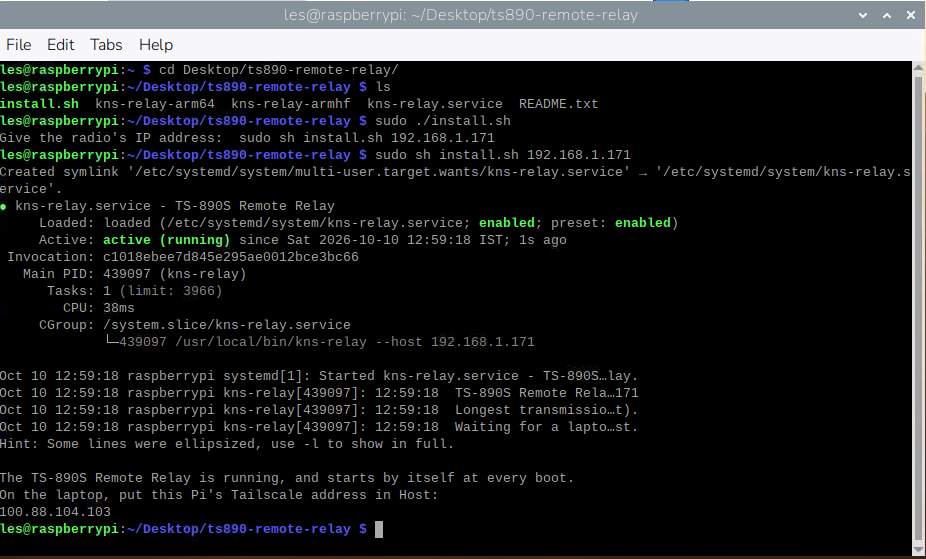
TS-890S DESKTOP FRONT PANEL
Download the right package for your computer, with the guide close at hand.